
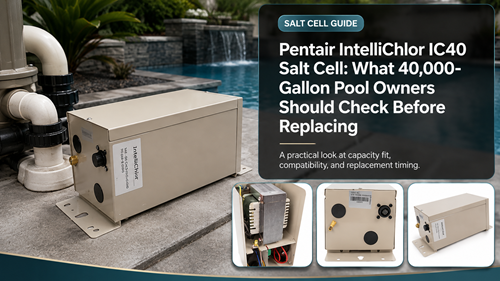
The Pentair IntelliChlor IC40 Salt Cell is a common choice for medium-to-large inground pools because it offers substantially more output than the IC20 while fitting the same IntelliChlor family. Pentair identifies the IC40 as the up-to-40,000-gallon model, with actual daily production determined by runtime and output setting.
A 40,000-gallon owner should avoid treating the cell rating as a guarantee of effortless sanitation at the maximum pool size. Long hot seasons, full sun, heavy use, and short circulation schedules can put a cell near full duty for extended periods and reduce operating headroom.
Pentair IntelliChlor IC40 Salt Cell Capacity
Start by confirming actual pool volume and the current cell’s normal percentage setting during peak season. If the IC40 spends most of summer close to maximum, document water chemistry and pump runtime before blaming the cell for high workload.
Use the site’s IC40 replacement checklist to separate capacity, maintenance, and compatibility from the replacement purchase itself.
Understand The Published Output
Pentair lists the IC40 at up to 1.40 lb of chlorine per 24 hours of continuous operation. That figure is useful for comparing models, while real production is scaled by the output percentage and active operating time.
The exact Pentair 520555 salt cell listing helps verify the US-version part number before ordering.
A 520555 Replacement Checklist
Photograph the current label and connector, verify the power center, inspect unions, and note whether automation is controlling the IntelliChlor. Then test free chlorine and salt independently before concluding that the cell has reached end of life.
A second 40K pool chlorinator cell reference is useful for checking the pool-size class and complete IntelliChlor context.
| Replacement Check | Healthy Evidence | Reason to Investigate |
|---|---|---|
| Salt | Independent test near recommended range | Large mismatch or warning |
| Flow | Flow indicator normal | Persistent low-flow status |
| Scale | Plates reasonably clear | Heavy deposits |
| Output | Maintains chlorine at sensible duty | Declining despite correct conditions |
| Power | Stable status LEDs | Intermittent or no power |
| Cell life | Expected remaining life | End-of-life indication with weak output |
Flow And Status Indicators To Review
IntelliChlor provides status information at the cell, including salt and system indicators. Treat those lights as diagnostic clues and compare them with independent pool tests and circulation conditions.
If the issue centers on the IntelliChlor flow indicator, resolve low water flow or a related flow-sensing problem before replacing a cell solely for lack of production.
A dirty filter, closed valve, low variable-speed setting, air leak, or inadequate water level can reduce flow. The cell should not be expected to chlorinate normally until circulation is corrected.
Cell-Life Factors And Maintenance
Cell life is influenced by cumulative operating time, output level, scale, chemistry, and environmental conditions. Running at high percentage for long periods increases duty time even when the calendar age looks modest.
Pentair’s user guide is the authoritative reference for IC40 lifespan factors, maintenance, status lights, water chemistry, and cleaning procedures.
Inspect for scale before cleaning. Use manufacturer-approved methods and protective equipment rather than frequent aggressive acid exposure.
Compatibility Before Ordering
Confirm Pentair cell compatibility against the installed Pentair power center and automation platform; a third-party compatibility claim should not override Pentair documentation.
- Confirm 520555/IC40 model
- Verify pool gallons
- Record power-center model
- Inspect union and cable fit
- Check flow indicator
- Test salt independently
- Inspect for scale
- Review output percentage
- Review cell-life indicator
- Check warranty before disposal
After replacement, verify actual free chlorine over the next normal operating cycles. A new cell should not be used to hide a circulation or water-chemistry problem.
Pentair IntelliChlor IC40 Salt Cell Ownership Records
Keep a simple service record for the Pentair IntelliChlor IC40 Salt Cell: installation date, pool volume, salt test results, output setting, pump runtime, cleaning dates, warning lights, diagnostic readings, and any replacement parts. A seasonal record makes it easier to distinguish gradual component wear from a sudden chemistry, flow, or configuration problem.
When performance changes, compare the new readings with the last period when the pool was stable. That history is more useful than replacing several parts at once, and it gives a pool professional better evidence if advanced electrical or controller diagnosis is needed.
Also record major seasonal changes such as unusually hot weather, a new pump schedule, filter service, heavy swimmer use, or a chemistry correction. Those events can change chlorination behavior without indicating hardware failure, and they make future replacement decisions more evidence-based.
Frequently Asked Questions
What pool size is the IC40 rated for?
Pentair lists the IC40 for pools up to 40,000 gallons.
What is the IC40 chlorine output?
Pentair documentation lists up to 1.40 lb of chlorine per 24 hours of continuous operation.
Does a red or abnormal flow indication mean the cell is dead?
No. Check actual circulation, filter condition, pump speed, valves, and flow sensing before replacing the cell.
What is the US part number for IC40?
The commonly listed US-version part number is 520555; verify the current product label and market version before ordering.
Should the IC40 be cleaned every month?
No fixed aggressive schedule should be assumed. Inspect for scale and follow Pentair’s current cleaning guidance when cleaning is needed.
